How do I make my first rap song?
Make a personal rap from a name and a few details, then edit, preview and unlock it.
Last updated: 2026-10-25
Yes—you can begin with a name and a few details, without writing a finished verse or signing in. Start with one person and one occasion. Lyrics are free to write; the music preview and full-song unlock are separate steps.
Make your first draft
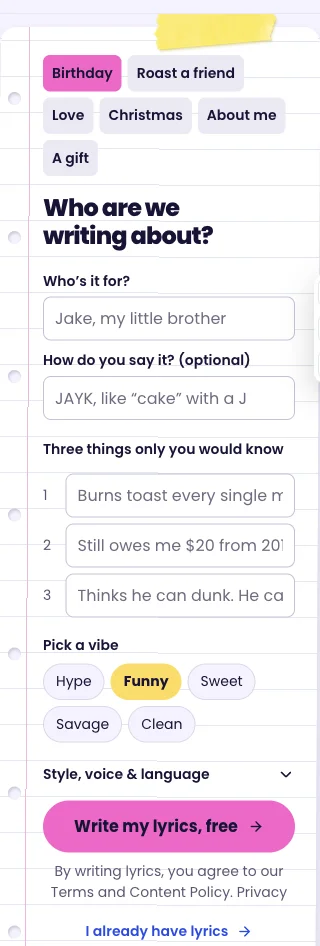
- Open the generator and choose the occasion. A birthday, a thank-you or a Christmas story gives the song a clear purpose.
- Enter the name and up to three details. Use moments the person will recognize: a karaoke habit, a memorable trip or the exact year of a running joke.
- Choose a vibe and write the lyrics. Read the result line by line. Remove anything that sounds invented, too private or unlike something you would actually say.
- Continue to the name check. Add a pronunciation hint, confirm the name and the adult/permission statements, then request a preview.
- Listen before deciding whether to unlock. Check the voice, the words you can hear and the overall mood. Full delivery includes the MP3 and a lyric card when the song is unlocked.
What should I check first?
Start with the most important person, number and fact. A beautifully rhymed line is not useful if it gets the birthday wrong. Short, concrete details usually fit a rap better than a long biography; keep one clear idea per line.
For a friendly roast, choose something the recipient already laughs about. Avoid medical information, addresses or an embarrassing story you have not been given permission to share. The name field is not a request to imitate that person's voice.
What this first version cannot guarantee
A preview is 30 seconds, so it cannot prove that every line later in the song is perfect. Runtime, delivery and pronunciation can vary. A new audio attempt may change the whole performance; it is not a recording studio with word-by-word control.
If you only want text, use the free lyrics tool. If a name needs care, read the pronunciation checklist. Keep a copy of important lyrics: a browser draft is temporary storage, not a permanent archive.
Add a face to your rap
Choose a clear front-facing portrait before writing. Use one consenting adult, two adults standing side by side, or one pet. JPEG, PNG and WebP are supported, up to 5 MB; faces must be clear and performers must be adults. No public figures or voice cloning.
Edit the lyrics, confirm the name and listen to the free audio preview. Rap Video includes the full MP3 and one 15-second performance. After checkout, select the audio start point and make the video on your delivery page. You can leave and return while it works. A 30-second clip uses two video credits; the full song is reused.
Private photos and temporary image derivatives are deleted after seven days. A confirmed video failure returns the video credit. One free video redo keeps the original length. Duo turns can briefly overlap, and pet mouths are an approximation; see usage rights and privacy.